
Last semester, a serendipitous thing happened. I was newly enrolled in a course called “Gaming and Virtual Reality Learning Environments” as part of my master’s program in Instructional Technology when the university’s instructional designer introduced me to a free game-creating tool called Aris. I needed to begin planning my final project for my class, an educational game. Although I was new to Aris and wary of the seemingly intricate design process, I decided to try it. I would build a game for my class project that would double as a game I could use with real students in the library. A creative project that kills two birds with one stone and will definitely (hopefully) increase student engagement with the library? Perfect!
What Is Aris?
Aris is open source gaming software used to create and play augmented reality experiences on iOS devices, created by a team at University of Wisconsin, Madison. I presented on using Aris to build a library game at the NYIT SpeedTech Conference 2017 — my slides can be found here — I’ll be incorporating a couple of the slides in this post. Basically, Aris can be used to create, play and share interactive tours and stories, usually in museums and classrooms.
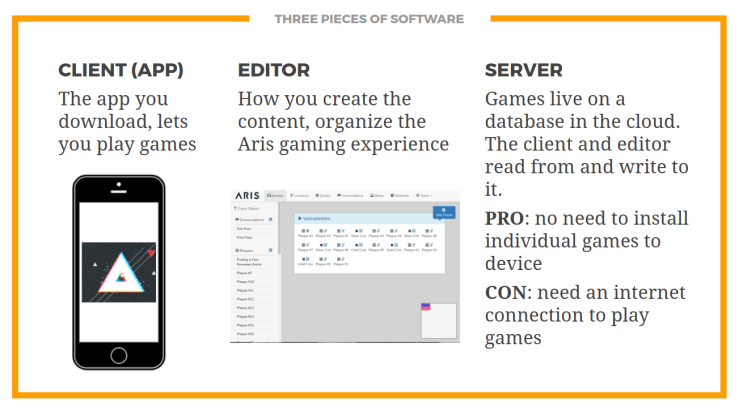
Aris features three main pieces of software:
Aris is not perfect. It’s got some bugs. But it’s open source, it generally runs just fine, and it allows for a lot of creative freedom by the game creator.

Designing & Editing
So, how does the game work? Game interaction is based on:
- Player location (GPS)
- QR codes
- Bluetooth beacons
- Navigation of the on-screen map
- Entering alphanumeric codes (e.g. “enter the price of an item”)
- Media collection (like taking pictures)
- Social interaction around media collection (e.g. commenting on someone’s picture)
I based all of my game interaction on QR codes. In the future, I will experiment with other types of interaction, like Bluetooth beacons and media collection. While you can do great things with Aris using GPS interaction (like create a tour of a college campus), my library is only three relatively small floors of a New York City building. In order to have students visit our three floors and locate specific points, they would have to play with QR codes.
I designed my game so that a player is prompted to locate a certain object (e.g. a self-checkout machine) then they must scan the QR code on that self-checkout machine in order to collect a coin and move on to the next objective.
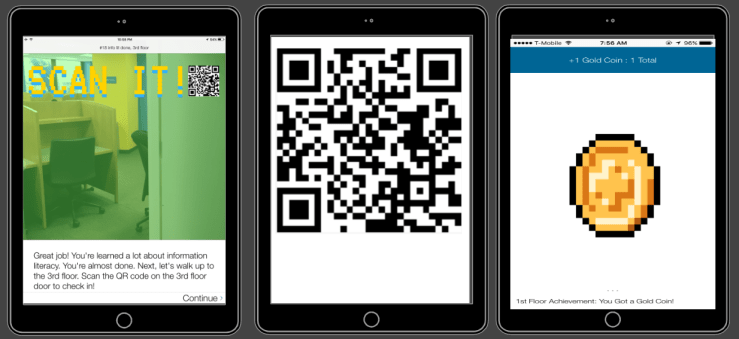
Designing and building the game seemed daunting, at first. But Aris offers online courses, a manual, and forums, so there is guidance along the way. I’m working with a group at my university that is building an orientation game using Aris, so I learned the ins and outs of the editor before attempting to build my own game. I’m more of a click-and-see-what-happens kind of person, so after trial and error I really only needed the manual on occasion.
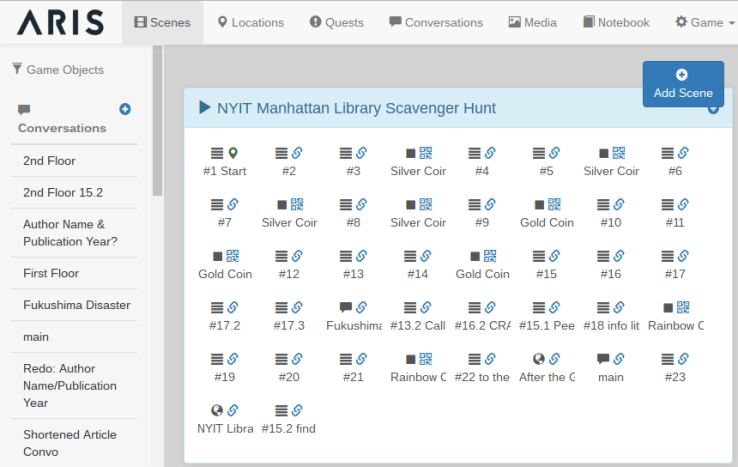
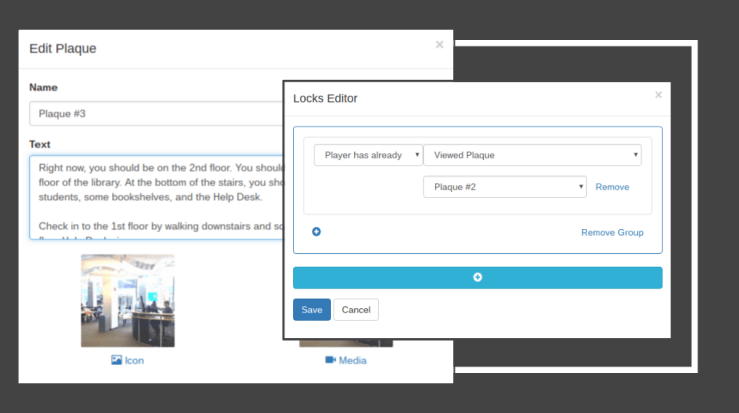
There is a lot to Aris — scenes, triggers, objects, plaques, and on and on. The manual covers all of it. What can be seen in my editor view is one scene that is filled with plaques, items, conversations, and web pages. The plaques are the main content screens that players see when interacting with the game, the items are the coins prompted by scanning a correct QR code, the web pages are the NYIT library website and a final survey, and the conversations are just that — conversations with the player. I took photos of the library, used Canva to stylize the images, created pixelated gifs (I followed this tutorial) using Photoshop, and created videos using Camtasia to populate the plaques, items, and conversations. Gameplay is controlled throughout by the creator, which is edited through “locks.” Locks allow the creator to control what players can access throughout the game. For example, Plaque 3 can only be viewed after Plaque 2 is viewed. That way, Plaque 3 is controlled and a player cannot jump forward before they are supposed to.
Storyboarding
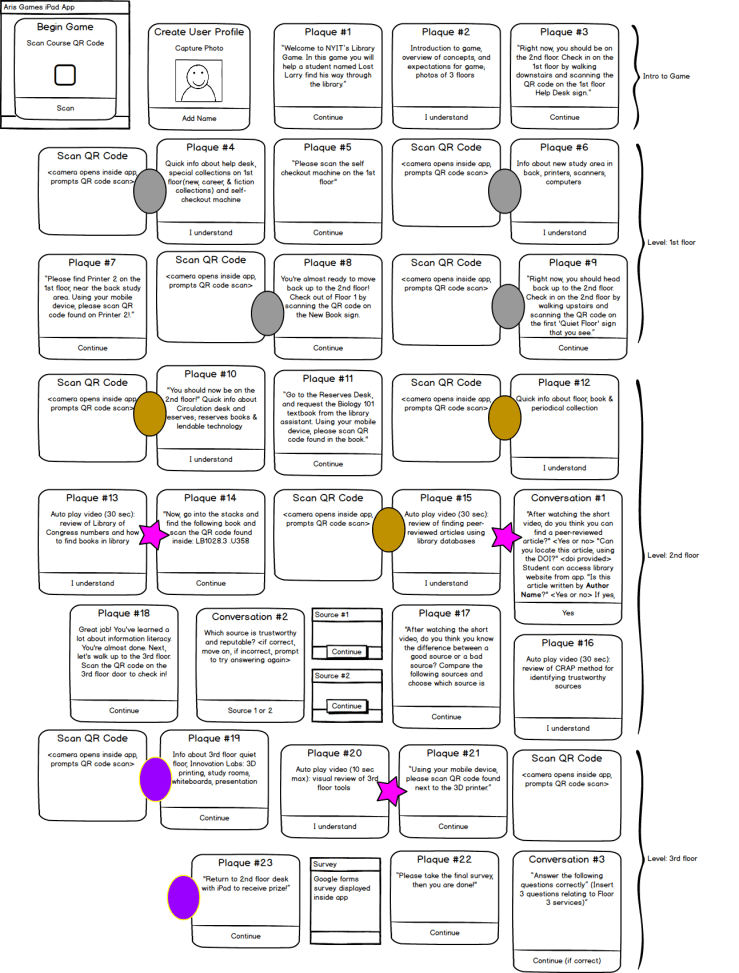
As part of my course requirements, I created a storyboard using the wireframing tool Balsamiq. This turned out to be incredibly helpful during the design process. I organized my entire game through this mockup before using the Aris editor. My Balsamiq storyboard can be seen below. The main blocks are plaques and conversations, and the differently colored ovals are awarded coins. The stars were an award item that I’ve since eliminated.
 Exploring Library Space
The game is about exploring the library as a physical space. I want students to feel challenged to explore the library in its entirety. Often, students find a location within the library where they feel comfortable, and they don’t venture beyond this single space. My hope is that the challenge to explore every part of the library will encourage students to utilize the library in every way possible. Rather than come to the library just to print, they’ll explore the book collections, browse the magazines, check out a laptop, and ask a librarian for research help. Much of the game requires players to locate a specific object and scan the QR code on that object in order to move forward. The game challenges students to locate objects like a self-checkout machine, the help desk, a reserves book, and a book in the stacks using a call number. I created a very short video tutorial teaching students how to read call numbers. Players are asked to watch the video tutorial before they are challenged to locate the book in the stacks, at which point they will scan the QR code found inside the book.
Information Literacy
I wanted students to practice information literacy skills. When players reach the second floor of the library (a designated quiet floor where librarians are located), they interact with the library as a virtual space in addition to the library as a physical space. I created a video tutorial about finding a peer-reviewed article using the library website. After watching the video, the player is sent to the library website, where they are challenged to repeat the search for the peer-reviewed article. The student is then prompted to answer questions about the article they found, and cannot continue until they answer correctly. The player then must watch another video, this time about choosing trustworthy sources. After watching the video, the player is presented with two sources about the environmental impacts of the Fukushima nuclear disaster. The player must choose between the two sources. The questions (a “conversation” in Aris) in editor and in play mode can be seen below.
Next Steps
I completed the game as classes were ending, so the game hasn’t been tested on students. I will work with instructors to bring their classes into the library for the hour, have students split up into groups of two or three depending on class size, check out iPads to the students, and let them begin the game while I monitor and standby for guidance. Another idea is to work with instructors to give students extra credit points for playing the library game from beginning to end. Our library does not lead scavenger hunts, so this will be a new challenge for us. Questions arise, such as how many students can play this game at once in our small library? How will we motivate students to complete the game (the answer might be candy awards)? What happens when students run into errors or tech issues? I’ll update this post as we find answers to these questions.
 naomi binnie